

Renaming a Link Safely: A Complete How-To Guide for 2026
Learn the right way of renaming a link without breaking SEO or analytics. This guide covers documents, CMS, social media, and advanced shortener workflows.

You've probably done this before. A campaign is live, the link is already in emails, a QR code is printed, and then you notice the slug is wrong or the wording no longer fits the offer. The urge is to jump in and rename it fast.
That's where small mistakes turn into long cleanup jobs. Renaming a link can mean three different things: changing the visible text, changing the destination URL, or changing the slug on a short link or page. Each one affects a different layer of your stack, and each one can break something different if you treat it like a simple text edit.
For a solo creator or a small team, the safest mindset is this: a link isn't just text. It's a distribution asset tied to clicks, attribution, search signals, documents, social posts, and sometimes printed material you can't recall. If you rename it carefully, you keep continuity. If you rename it casually, you create hidden problems that surface later.
Table of Contents
- Why Renaming a Link Is Riskier Than You Think
- How to Rename Links in Common Applications
- The SEO and Analytics Impact of Changing URLs
- A Better Workflow Renaming Links with 302.sh
- Creating a Rollback and Link Maintenance Plan
- Conclusion and Frequently Asked Questions
Why Renaming a Link Is Riskier Than You Think
You launch a promotion with go.mybrand.com/sumer-sale, then spot the typo after it's gone out. The corrected version is obvious. The consequences aren't. Anyone who already clicked, saved, shared, or scanned the old link still expects it to work.

One typo can create three separate problems
The first problem is access. If the old path disappears, people hit an error page instead of your campaign.
The second problem is measurement. If you create a new link and abandon the old one, your data gets split across two assets. That makes it harder to compare performance over time.
The third problem is distribution. You can edit a draft email or a website. You can't edit a printed QR code, a social post someone reshared, or a newsletter that already landed in inboxes.
A 2024 Ahrefs study on link rot found that 66.5% of links have gone dead over the past nine years, and it also noted that 18% of websites delete the old URL without implementing a proper redirect, which causes irreversible loss of traffic history. This is a major risk behind casual renaming. The error usually isn't the rename itself. It's removing the old route before you've preserved continuity.
What actually breaks when teams move too fast
A link is often thought of as a label plus a destination. In practice, a live link behaves more like a contract. People expect the old version to keep resolving, analytics tools expect stable identifiers, and search engines expect a clean handoff if a URL changes.
Practical rule: If a link has already been published anywhere outside your direct control, treat a rename as a migration, not an edit.
That means pausing before you touch the slug and asking a few questions:
- Where is it already embedded: Check emails, social posts, bios, PDFs, landing pages, QR codes, and partner placements.
- What needs to stay intact: Preserve backlinks, bookmarks, and any click history you'll need later.
- Who will notice first: Customers usually find the break before the team does, especially when the old link lives in older assets.
The safest habit is simple. Never rename first and figure out the redirect later. Map the old path, decide where it should resolve, and only then make the change.
How to Rename Links in Common Applications
Not every rename is a URL migration. Sometimes you only need to change the words people see. Other times you're changing the underlying address. Those are different jobs, and the tools handle them differently.
Google Docs and Microsoft Word
In Google Docs and Microsoft Word, the clean approach is to edit the link through the built-in link editor, not by deleting and retyping text. The reason is straightforward: the visible words and the destination are separate.
Use this flow:
- Select the linked text: Click the existing hyperlink, then open the edit option.
- Change only the display text if that's all you need: This keeps the destination untouched.
- Change the destination in the dialog if the URL itself must change: Confirm the full URL before saving.
- Test the link after editing: Click it once from the document, especially before exporting or sharing.
In these tools, using the formal Edit Link dialog has a 100% success rate, while manual text deletion and replacement carries a 15% risk of breaking the link because people often alter the URL itself rather than just the display text. That's in the verified data you provided, and it matches what practitioners see every day.
Changing the words people read does not change where the link goes. That assumption breaks a lot of documents.
If you're also cleaning up short links for campaigns, it helps to understand how custom slugs are created in the first place. This guide on how to create a Bitly style short link gives useful context for naming conventions and slug structure.
Markdown GitHub and code based tools
Markdown is cleaner because the structure is explicit: anchor text. You rename the visible text by changing the part in brackets. You change the destination by editing the URL in parentheses.
That's usually safer because you can see both pieces at once.
A few practical habits matter here:
- Edit in preview when possible: A live preview makes syntax mistakes easier to spot.
- Avoid touching the URL unless the destination really changed: Many accidental breaks happen during copy cleanup, not migration work.
- Check the rendered result: One missing character can break the link output in a static site or README.
Markdown and code-based environments are easier to reason about because the display text and destination are already separated in the syntax. That doesn't remove risk entirely, but it does make renaming a link more transparent.
WordPress and other CMS tools
CMS platforms add another layer. You might be changing:
- the linked text inside a post,
- the target page URL, or
- the page slug itself.
If you're updating text inside the editor, treat it like a document edit. Change the anchor text or destination intentionally, then test.
If you're changing a page slug or permalink, be more careful. That kind of rename affects inbound links, search indexing, and older references across your site and outside it. Many modern CMS setups can create redirects automatically, but you shouldn't assume they did. Verify the old URL resolves correctly after the change.
A good CMS workflow looks like this:
| Task | Safe action | Common mistake |
|---|---|---|
| Rename anchor text | Edit the text only | Replacing the whole link manually |
| Change destination URL | Update the URL field and test | Leaving old internal references behind |
| Change page slug | Save the new slug and verify redirect behavior | Publishing the new slug without checking the old path |
When teams get into trouble here, it's rarely because the editor is hard to use. It's because they changed one layer and forgot the others.
The SEO and Analytics Impact of Changing URLs
Changing a URL has two audiences. Search engines need to understand where the content moved. Analytics systems need to understand whether the thing being measured is still the same asset or a new one.

Search engines need a clear signal
If a page URL changes, a 301 redirect is the standard signal that the old address has moved permanently. A 302 is temporary. That distinction matters because you're telling crawlers whether to update their understanding of the canonical location or keep expecting the old URL to return.
If you want a quick technical refresher, this explainer on 301 vs 302 redirects is useful.
From an SEO perspective, the common failure isn't just “we changed the slug.” It's “we changed the slug and didn't preserve the path from old to new.” That leaves backlinks, bookmarks, and indexed results pointing at an address that no longer serves the user.
Analytics history breaks more easily than most teams expect
Analytics problems are often quieter than SEO problems. A broken redirect becomes obvious fast. Broken history usually shows up later, when you try to compare campaign performance and realize your reporting is split between old and new identifiers.
A 2025 Content Marketing Institute finding cited in the verified data says 68% of marketers lose historical campaign data when link metadata is altered without a specific migration strategy. That's the gap most basic tutorials miss. They explain the redirect, but not how to preserve continuity in reporting.
If your reporting tool treats the renamed link as a new object, the redirect may save traffic while still breaking your historical view.
That's why renaming a link should trigger a checklist, not just a field edit. Ask whether your analytics platform ties data to the original short link entity, the slug, the destination URL, or the campaign parameters. Those are not the same thing.
A useful way to think about the trade-off:
- Fastest route: Create a new URL and move on. Simple, but it often fragments history.
- Safer route: Keep the old route alive, map it to the new destination, and preserve measurement intentionally.
- Best route for active campaigns: Use a link management setup that lets you update behavior centrally without forcing every published asset to change.
That last option becomes far more important once links live across email, social, docs, and print.
A Better Workflow Renaming Links with 302.sh
The cleanest way to handle a rename is to stop thinking in terms of isolated copies of a URL. Think in terms of a single managed link asset that you can control from one place.

Use one control point instead of chasing copies
A dedicated shortener transcends mere convenience. When a short link is embedded in multiple places, the main challenge isn't creating the updated version. It's preserving behavior everywhere the old one already lives.
That's a major reason teams use hosted shorteners with centralized management. A shortener gives you one place to control the slug, destination, and routing logic without manually republishing every asset.
A practical overview of those capabilities is on the 302.sh features page.
How a managed rename works in practice
A solid workflow looks like this:
- Find the existing short link in your dashboard: Don't start by making a second link unless you have a deliberate reason to split reporting.
- Decide what is changing: You may need to change the slug, the destination, or both.
- Preserve the old path: If the old slug has already been distributed, keep it resolving so earlier clicks still land correctly.
- Confirm analytics continuity: Make sure your reporting follows the managed link asset rather than treating the new slug as a separate campaign unless you want that split.
- Retest every public touchpoint that matters: Email, social bio, QR code destination, website button, and any partner placements.
This matters most when the link is already out in the world. A major pain point for campaign managers is updating a link embedded in multiple places such as emails, social posts, and QR codes. The verified data notes that a shortener API like 302.sh's lets you change the link's destination globally, so even old posts and printed materials point to the new location without being republished, as described in this discussion of global link updates through a shortener API.
Old assets don't become a liability if the redirect layer is the thing you control.
That's the operational advantage. You stop chasing copies and start managing the routing layer.
When to use the API or bulk updates
For a single campaign link, dashboard editing is enough. For a client migration, a product launch rename, or a seasonal cleanup, manual updates get messy fast.
Use the API when:
- Your links appear in many templates: Email systems, internal tools, landing page builders, and social automation tools can all reference the same managed short link.
- You need consistency across channels: One update should affect web, docs, QR codes, and social placements together.
- You want fewer human edits: Less copy-paste means fewer chances to break a route.
Use bulk CSV operations when you're handling a larger inventory. That's useful when you're consolidating old links, standardizing naming conventions, or preparing a redirect map before a broader site or campaign migration.
The key idea isn't that every rename needs heavy infrastructure. It's that once a link has been distributed widely, central control is what keeps the rename from turning into a scavenger hunt.
Creating a Rollback and Link Maintenance Plan
Teams usually think about rollback after something breaks. That's late. The better move is to treat renaming a link like any other small production change: document the current state, make the update, and keep an easy path back.

Build a redirect map before you touch anything
A redirect map can be a simple spreadsheet. It doesn't need to be fancy. It needs to be complete enough that someone else on your team could understand what changed and reverse it if needed.
Include columns like these:
| Field | What to record |
|---|---|
| Old link | The original short URL, page URL, or slug |
| New destination | Where it should resolve now |
| Link type | Short link, blog post, landing page, PDF link, QR code |
| Published locations | Email, social, docs, paid ads, print, partner pages |
| Status | Planned, changed, verified, rolled back |
| Notes | Why the rename happened and any exceptions |
This gives you two benefits. First, you can execute changes without guessing. Second, if someone reports a problem, you can trace what happened without relying on memory.
A rollback plan is just a written answer to one question: if this rename causes confusion, what do we restore first?
A simple maintenance rhythm that prevents surprises
After the rename, don't assume the job is done because your first test worked. Link issues often come from edge cases: an old QR code, a partner page, a stale internal document, or a redirect chain that no one revisits.
A practical maintenance rhythm looks like this:
- Check priority links first: Review homepage CTAs, active campaign links, top email automations, and any short links used in print.
- Audit internal references regularly: Look for older pages, PDFs, and resource hubs that still point at retired destinations.
- Watch analytics for anomalies: Sudden drops in clicks or mismatched attribution often signal that the route changed in one place but not another.
- Keep redirects longer than you think you need: People save links in bookmarks, notes, Slack threads, and newsletters.
For small teams, ownership matters more than tooling. One person should be responsible for the inventory, even if the actual edits happen in different platforms. Without that ownership, renaming a link becomes everybody's task and nobody's system.
You don't need an enterprise process. You need a repeatable one.
Conclusion and Frequently Asked Questions
Renaming a link safely isn't a text-edit problem. It's a continuity problem. You're protecting access for people who already have the old URL, preserving search and referral value when a destination changes, and keeping your analytics readable enough to make decisions later.
The practical rule is simple: if the link has already been published, don't replace it casually. Decide whether you're changing visible text, changing the destination, or changing the slug itself. Then preserve the old path, test the updated route, and document what changed.
FAQ
What's the difference between a 301 and a 302 when renaming a URL
A 301 tells browsers and search engines that the move is permanent. That's usually the right choice when a page or campaign URL has changed for good. A 302 signals a temporary move, which is better when the original URL is expected to return.
Can I change a link inside a sent email or a printed QR code
Not directly. Once an email is sent or a QR code is printed, that asset is fixed. What you can still control is the destination behind a managed short link. That's why shorteners are so useful for live campaigns and offline materials.
How long should I keep the old link redirecting
Longer than initially expected. Keep it active for as long as people may still encounter the old version through bookmarks, search results, old social posts, PDFs, newsletters, or printed materials. If the link had meaningful distribution, removing the redirect too early usually creates more downside than upside.
If you want one place to manage slug changes, preserve campaign continuity, and update destinations without chasing every old post or QR code, 302.sh is built for exactly that. It gives small teams and creators centralized short links, branded domains, QR codes, and analytics while keeping the redirect layer under your control.
Change a printed QR code's destination with 302.sh
There are two different edits to consider: changing a short link's name changes its public address; changing its destination keeps that address. Choose the edit before sharing or printing your link.
The QR code must contain a short URL you control in your 302.sh account. A code that directly contains the destination URL cannot be changed through 302.sh. Use an account-owned link for printed materials; an anonymous temporary link is not suitable.
- Open the existing link's detail page from Your links, then select Edit.
- In Link settings, change Target URL. Keep the domain and Custom slug unchanged.
- Select Save settings. Reopen the settings to check the saved target.
- Open the original short URL again and scan the original QR code. Confirm the intended destination before relying on the change. Updates may take time to appear on every visit.
Changing Custom slug creates a different short URL and the old slug stops resolving. Past click history stays attached to the link. Renaming is not the right edit when you need to preserve an address already in circulation.
Same QR image, new destination: our test
Maker-run test, 16 September 2026. We used a dedicated link in our own Creator account, captured its displayed QR image before the edit, and decoded that saved image with software. It contained https://3go.to/printed-qr-proof-260916. The shared domain 3go.to is operated by 302.sh.

| Check (UTC) | Observed destination |
|---|---|
| 10:56:29 — before the edit | 302.sh/blog/google-review-qr-code |
| 10:57:08 — about 17 seconds after selecting Save settings | The same browser tab still reached the old Google review guide. |
| 10:57:37 — about 46 seconds after selecting Save settings | A new browser tab reached 302.sh/blog/renaming-a-link. |
| 10:57:46 — about 55 seconds after selecting Save settings | The original browser tab also reached this renaming guide. |
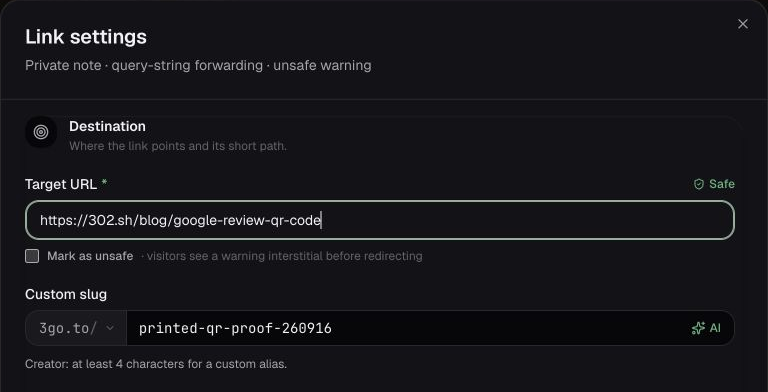
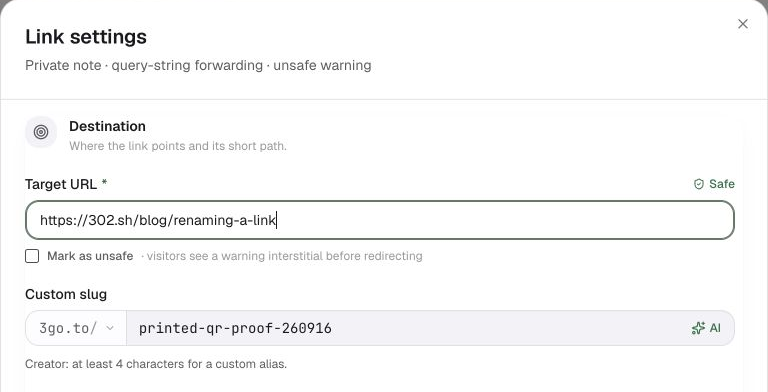
We decoded the same saved QR file again after the edit; its bytes and encoded URL were unchanged. Both the new-tab and repeated original-tab visits reached the new target. You can open the demo short URL or save the original image above to inspect it yourself.
This verifies one ordinary link in our Creator account, using software QR decoding and browser navigation. It is not a physical-print scan, a Free-account test, an independent review or a global propagation benchmark. No password, expiration, click limit, cloaking or conditional routing was enabled. The observed timings are individual checks, not a promised update deadline. Test your own printed code on the phones, networks and placements you expect to use.
If you have not created the link yet
- Open New link and paste the full destination URL. Keep any campaign parameters you need in that destination.
- Choose a custom slug such as
spring-guide. New links use3go.toby default; your own verified domain is a paid-plan option. - Create the link, copy its complete short URL, and test it in a private browser window. Check the final destination before adding it to a post or QR code.
- Open the link's analytics page to see recorded clicks. You can explore the interface first in the public dashboard demo.
Plan limits and long-lived links
Our current plan definitions, separate from the Creator-account test above, give Free 5 new links per UTC month, up to 50 owned links, 5 custom slugs per month (at least 6 characters), 2,000 analytics events per month, and 90-day analytics retention. Free does not include an active custom domain. Deleting links does not refund monthly creation allowance. Reaching the analytics allowance stops additional tracking, not redirects. Owner-set expiration or click limits, deletion, and safety enforcement can still stop a link.
A domain you control gives you a migration option if you change providers; it still needs renewal and a working redirect service. Follow the custom-domain setup guide, review what click analytics measures, or check the current plan limits.